


This article was automatically translated from the original Turkish version.

Asana (Project Management Tool)
Name | Asana | ||||||||
|---|---|---|---|---|---|---|---|---|---|
Type | Project and Task Management Software | ||||||||
Foundation Year | 2008 | ||||||||
Founder | Justin Rosenstein Dustin Moskovitz | ||||||||
Publication Date(s) | 2011 (Beta Release) | ||||||||
Company | Asana, Inc. | ||||||||
Headquarters | San Francisco, California, United States | ||||||||
Working Model | Cloud-based (SaaS) | ||||||||
Platform | iOS Android Web | ||||||||
Language Support | Multilingual (including Turkish) | ||||||||
Website | https://asana.com/ | ||||||||
Asana, Inc. is a cloud-based work and project management platform developed by Asana, Inc. The company was founded in 2008 by Dustin Moskovitz, one of Facebook’s co-founders, and software engineer Justin Rosenstein, who observed during their time at Facebook that teams wasted significant time on “work about work” such as meetings and email traffic. They set out to build a tool that would enable all teams to coordinate their work more effectively. Asana’s team advocates that all teams—regardless of size (from 1 to over 100,000 people) and purpose—should use the same platform to collaborate on tasks, projects, and goals by unifying them in a single source of truth that clearly shows who is working on what and where, in one consistent format.
Asana Proje Yönetim Yazılımı, (WebTekno)
Asana is delivered as a SaaS (software as a service) platform accessible via web browser and supported by iOS and Android applications. It enables real-time collaboration among users. Its backend infrastructure is hosted on Amazon Web Services (AWS) data centers, ensuring high availability and SOC2 compliance. The company does not offer an on-premises version.
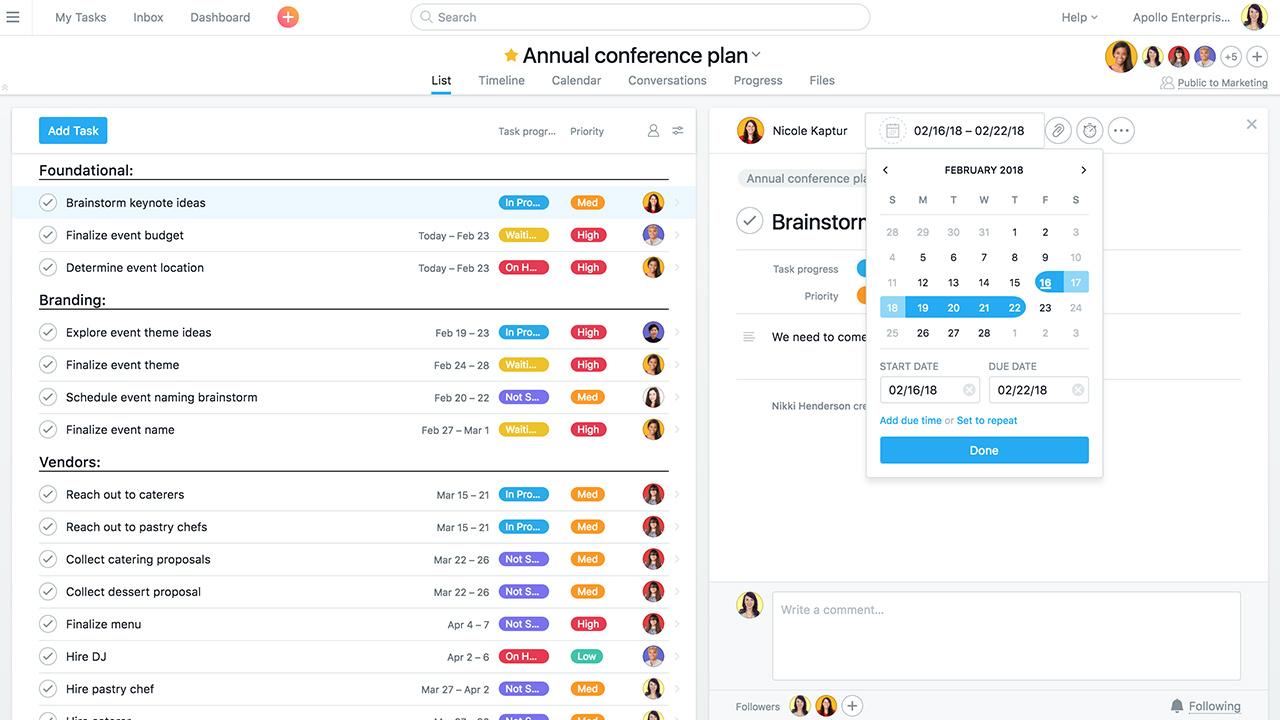
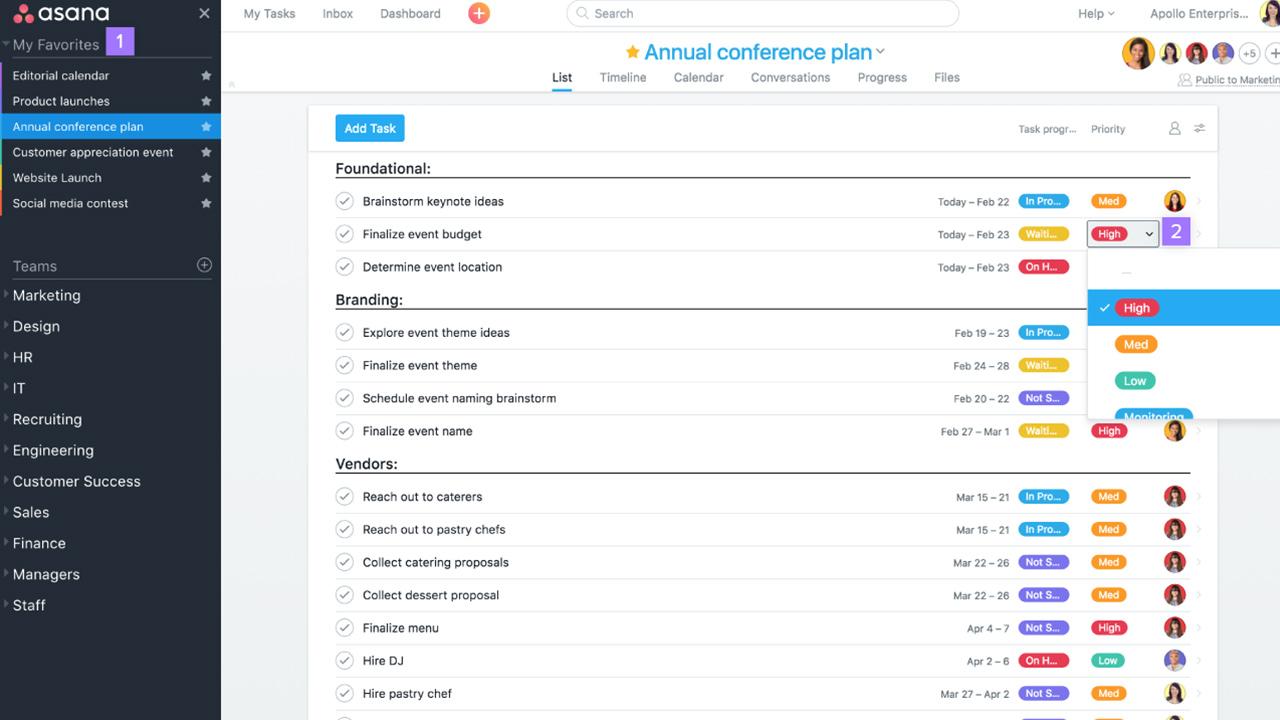
In Asana tasks and subtasks can be defined. Each task can be assigned to a project with a due date assignee and additional details such as file attachments and comments. Projects can be viewed in multiple formats: list view board (Kanban) calendar view and timeline (Gantt) view offering flexible layouts. For instance the timeline view visualizes project progress by defining task dependencies. Custom fields allow tasks to be enriched with additional data labels enabling filtering and reporting by criteria such as type priority or cost.
Asana Proje Yönetim Yazılımı, (WebTekno)
Asana’s “Work Graph®” data model maintains relationships between work projects and users in a flexible graph structure. This enables teams to intelligently connect and scale interdependent tasks projects and goals. The platform offers extensive integration support (over 100 popular tools such as SlackGoogle Drive and Microsoft Teams) to easily exchange data with other software. Its developer API (based on GraphQL) allows for custom integrations and automations. For enterprise customers additional security and reuse features are provided including SAML-based single sign-on advanced security controls and management APIs. Task history is logged in all plans free and paid and team members can track updates via mobile apps even when on the move.
Asana occupies a position as a “work management” tool in modern project management approaches. Its purpose is to consolidate teams’ tasks and projects into a single central platform and organize communication within the context of work. In Asana projects are structured hierarchically as tasks and team members track their assigned tasks and projects on the platform. Planning can be conducted at the project level using timelines and boards to visualize project phases and define responsibilities.
Asana supports both traditional (Waterfall) and agile (Scrum/Kanban) methodologies. It is used by diverse teams across disciplines and industries to manage projects and work. Features such as backlog management sprint planning and Kanban boards are designed to support Agile methods for software development teams. Asana enables software teams to collect feedback and organize tasks on Kanban boards facilitating rapid delivery cycles. At the same time Asana is widely used beyond technical teams in areas such as marketing product management operations and human resources. The platform can be adapted to various workflows such as campaign tracking new product launch planning event management or hiring processes. As highlighted in Asana’s blog materials Agile methods are not limited to software projects but are an approach adopted by all types of teams to increase flexibility. According to Gartner guides Asana is listed among tools commonly used for a wide range of “Backlog management and Kanban” tasks such as feedback management product development and project delivery. Asana’s customer base includes not only technology companies but also educational institutions healthcare organizations and marketing agencies. Teams using the platform aim to customize their processes to enhance collaboration.
Thanks to Kanban-style views visualizing task flow is straightforward. Different teams synchronize their projects and goals within this tool to enable cross-functional collaboration. Thus engineering marketing design and other teams can instantly see who is doing what and what has been completed. Asana helps managers maintain an overview by summarizing project progress through “Status Updates” and “Portfolios” in consolidated reports.
Asana’s free Personal (Flexible) plan offers core features for individual users and small teams. Up to 10 people can be included in a team under this plan with unlimited tasks projects and messages. Basic project views such as personal lists board (Kanban) and calendar task assignment and due dates along with mobile app support are included in the free plan. Reporting and search capabilities are limited to simple filters.
The paid Starter and Advanced plans include all features of the free plan and add advanced management tools. Paid plans remove user count limits. For example timeline (Gantt) view custom fields forms project dashboards and advanced search and reporting are available only in paid plans. Additionally workflow automation rules (automatic task assignment notification triggers etc.) and project templates are available in paid packages. The Advanced plan adds extended enterprise functionality such as portfolio management (overseeing multiple projects at a high level) workload balancing and goal management. The enterprise-level Enterprise plan provides advanced security features (SAML SSO policy enforcement) and priority support. Pricing is determined through direct company contact. According to Asana’s pricing structure the Starter plan starts at approximately USD 10.99 per user per month (annual billing) and the Advanced plan starts at USD 24.99. In summary the free plan limits team size and customization while paid plans offer advanced functionality to meet enterprise needs through comprehensive project tracking reporting and management capabilities.
Asana is one of the leading players in the global work management and project management market. According to the company it is used by over 100000 paid organizations and millions of teams worldwide. Analyst reports also position Asana as a significant solution. In Gartner’s 2024 Magic Quadrant for Collaborative Work Management (CWM) report Asana was ranked in the “Leader” quadrant. This report classifies CWM software based on enterprise vision and execution capability.
Asana competes in a market that includes numerous platforms such as Atlassian Jiraand TrelloMicrosoft Planner/Teams Smartsheet monday.com Wrike Airtable and ClickUp. On user evaluation platforms such as Gartner Peer Insights Smartsheet Atlassian Jira Atlassian Trello Airtable and monday.com are frequently listed among the highest-rated products alongside Asana. For example in Gartner evaluations Smartsheet Jira Airtable and monday.com are presented alongside Asana as recommended tools.
Asana, Inc. *About Us*. Accessed May 18, 2025.https://asana.com/company.
Asana, Inc. *Asana’s Tech Stack: How we build a collaborative app for teams of all sizes.* Asana Inside Blog, February 28, 2022.https://blog.asana.com/2022/02/asana-tech-stack/.
Asana, Inc. *Pricing*. Accessed May 18, 2025.https://asana.com/pricing.
Asana, Inc. *Stories from our first year*. Asana Inside Blog, November 12, 2012.https://blog.asana.com/2012/11/stories-from-our-first-year/.
Asana, Inc. *Understand Asana’s core features*. Accessed May 18, 2025.https://asana.com/features.
Asana, Inc. *What Is Agile Methodology? (A Beginner’s Guide)*. By Sarah Laoyan. Asana Resources, February 20, 2025.https://asana.com/resources/agile-methodology.
Dere, Uğurcan. “Evden Çalışan Şirketlerin Gözdesi ‘Asana’ Nasıl Kullanılır?” Webtekno, March 26, 2020.https://www.webtekno.com/asana-android-ios-indir-h87906.html.
Gartner, Inc. *Collaborative Work Management Reviews and Ratings*. Gartner Peer Insights, 2025.https://www.gartner.com/reviews/market/collaborative-work-management.

Asana (Project Management Tool)
Name | Asana | ||||||||
|---|---|---|---|---|---|---|---|---|---|
Type | Project and Task Management Software | ||||||||
Foundation Year | 2008 | ||||||||
Founder | Justin Rosenstein Dustin Moskovitz | ||||||||
Publication Date(s) | 2011 (Beta Release) | ||||||||
Company | Asana, Inc. | ||||||||
Headquarters | San Francisco, California, United States | ||||||||
Working Model | Cloud-based (SaaS) | ||||||||
Platform | iOS Android Web | ||||||||
Language Support | Multilingual (including Turkish) | ||||||||
Website | https://asana.com/ | ||||||||
Technical and Functional Features
Core Features
Use Cases and Scope
Areas of Use
Free and Paid Plan Differences
Market Position and Key Competitors
Position