


This article was automatically translated from the original Turkish version.
Spatial filtering is a widely used method in image processing and signal processing. This technique aims to modify specific characteristics of an image by directly manipulating its pixels. Operations such as noise reduction, edge detection, sharpening, or blurring can be performed using spatial filtering.
Spatial filtering is a technique used in digital image processing and signal processing to modify or enhance specific features of an image by directly manipulating pixel values. This method operates on the spatial domain data of an image; that is, it performs operations on pixel coordinates and intensity values. Spatial filtering differs from frequency domain filtering techniques (such as those based on the Fourier transform) because it works directly on the raw pixel data without any transformation.
The foundation of spatial filtering lies in applying a small matrix called a “kernel” or “mask” to each pixel of the image. This kernel generates a new output value by combining the value of a central pixel with weighted values of its neighbor pixels. The process is applied across the entire image using a sliding window technique. This process is mathematically known as “convolution” and forms the fundamental structure of spatial filtering.
When an image is represented as f(x,y) and the kernel as h(m,n), the output image g(x,y) resulting from spatial filtering is calculated using the following formula:
This formula indicates that the kernel is centered over each pixel and the weighted sum of neighboring pixel values is computed.
1- Kernel Selection: For example, a 3x3 averaging filter is used.
This kernel assigns equal weight (1/9) to each pixel.
2- Sliding Over the Image: The kernel is placed over each pixel, starting from the top-left corner of the image. For edge pixels, techniques such as zero padding or reflection are commonly used.
3- Computation: Assume the pixel values in a region of the image are as follows:
The kernel is applied to this region as follows:
Center pixel’s new value becomes 50.
4- Result: This operation is repeated for every pixel in the image to produce a filtered output image.
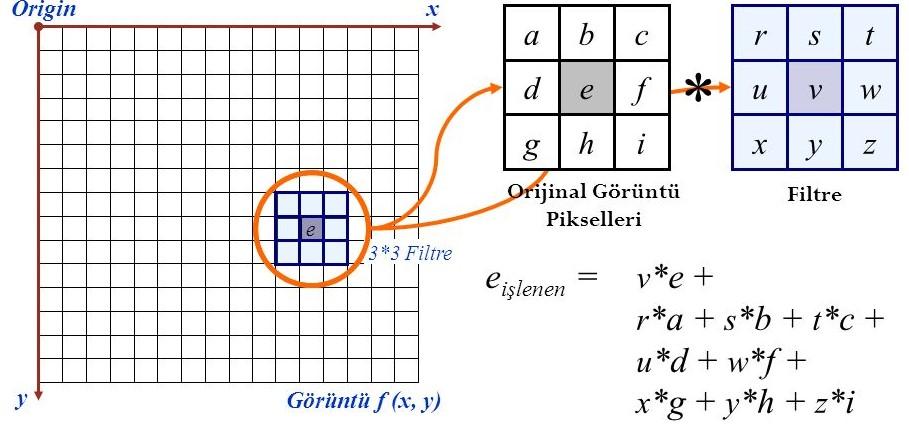
Pixel operation between original and filtered image (Credit: Gonca İnönü)
Spatial filtering can be used for various purposes:
Spatial filtering types are broadly categorized into two main categories: low-pass filters and high-pass filters. Based on the application method, they are further divided into linear filters and nonlinear filters.
Low-pass filters preserve low-frequency components in an image while suppressing high-frequency components such as abrupt changes and sharp edges. These filters are commonly used to smooth images and reduce noise.
The Mean Filter creates a kernel around each pixel and assigns the average of all pixel values within the kernel region as the new value for that pixel in the filtered image.

Prepared and edited by: Beyza Nur Türkü
The Gaussian Filter blurs the image by combining pixel values with weights based on a Gaussian distribution. Pixel weights vary with distance: pixels closer to the center receive higher weights, while distant pixels receive lower weights.

Prepared and edited by: Beyza Nur Türkü
The Median Filter replaces the value of each pixel with the median value of all pixel values within its kernel region.
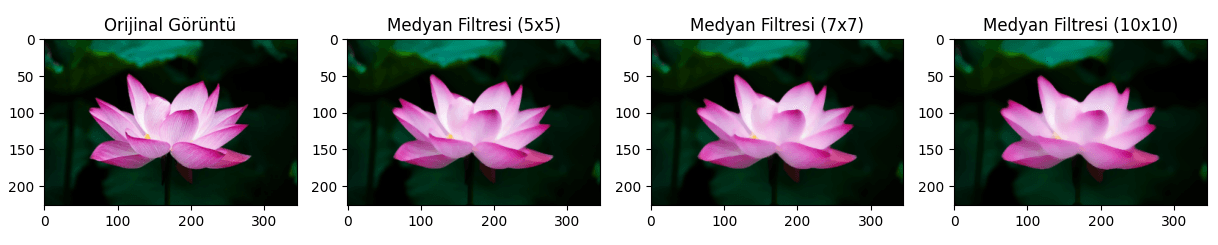
Prepared and edited by: Beyza Nur Türkü
The Minimum Operator or Minimum Filter assigns the smallest value within a specified region surrounding each pixel as the new pixel value.

Prepared and edited by: Beyza Nur Türkü
The Maximum Operator or Maximum Filter assigns the largest value within a specified region surrounding each pixel as the new pixel value.

Prepared and edited by: Beyza Nur Türkü
In the Disk Filter, the kernel has a circular shape, hence its name.

Prepared and edited by: Beyza Nur Türkü
The k-NN Filter (k-Nearest Neighbors Filter) computes a new value for a pixel by considering the values of the k most similar neighboring pixels. “Similarity” is typically determined by intensity similarity, and the center pixel’s value is updated using the average of these neighbors.

Prepared and edited by: Beyza Nur Türkü
High-pass filters emphasize high-frequency components such as edges and details while suppressing low-frequency components such as smooth regions. These filters are commonly used for image sharpening or edge detection.
The Sobel Filter highlights edges by computing intensity gradients in the image. It typically uses two separate kernels to calculate horizontal and vertical gradients separately, and the combined gradient magnitude and direction determine the precise location and strength of edges.

Prepared and edited by: Beyza Nur Türkü
Prewitt Filter, similar to the Sobel Filter, highlights edges by computing intensity changes in the image.
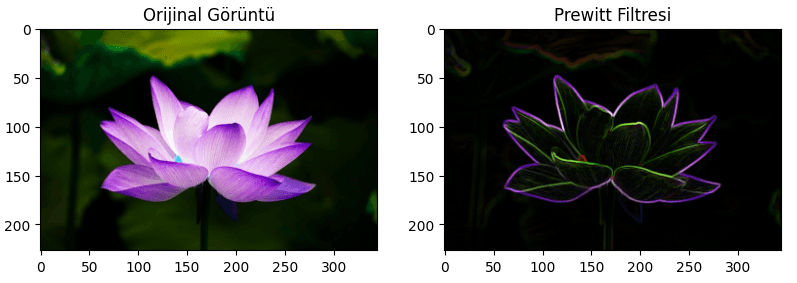
Prepared and edited by: Beyza Nur Türkü
The Laplacian Filter highlights edges by computing the second derivative of the image intensity, detecting the rate of intensity change. The Laplacian Filter does not provide directional information only the magnitude of intensity changes.
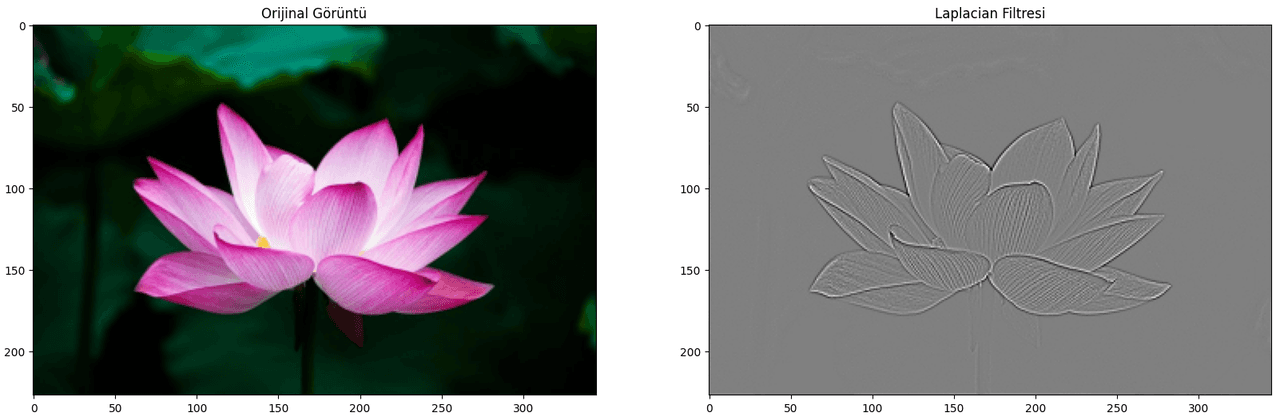
Prepared and edited by: Beyza Nur Türkü
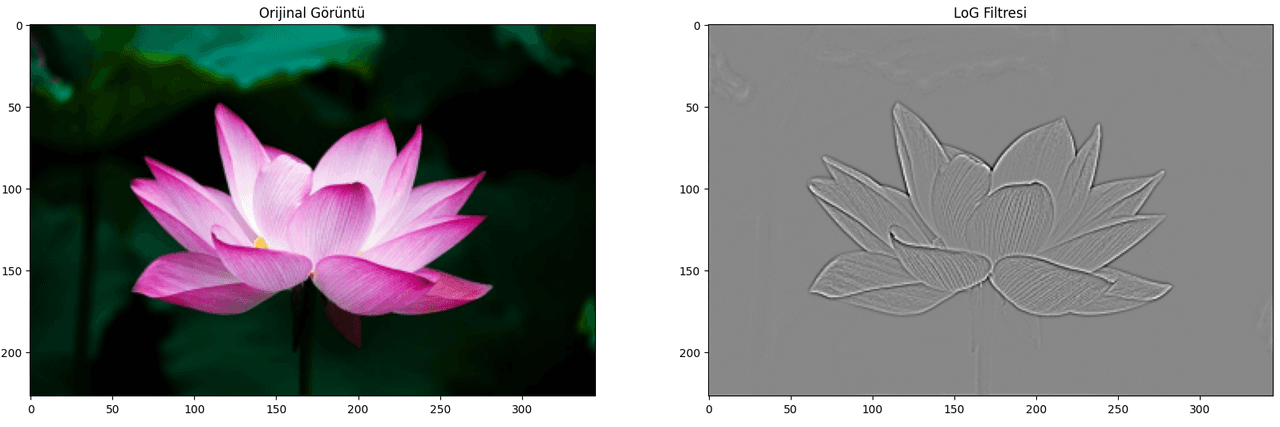
The LoG (Laplacian of Gaussian) Filter is a combination of the Gaussian and Laplacian filters. First, the image is smoothed using Gaussian blurring, then the Laplacian operator is applied to compute the second derivative to highlight edges.
Prepared and edited by: Beyza Nur Türkü
Al-Mustansiriya University. “Spatial Filtering Lecture Notes.” Accessed March 23, 2025.https://uomustansiriyah.edu.iq/media/lectures/9/9_2020_03_29!01_33_39_AM.pdf.
Edmund Optics. "Understanding Spatial Filters." Accessed March 23, 2025.https://www.edmundoptics.com/knowledge-center/application-notes/lasers/understanding-spatial-filters/.
Fiveable. "Spatial Filtering - Computer Vision and Image Processing." Accessed March 23, 2025.https://library.fiveable.me/computer-vision-and-image-processing/unit-2/spatial-filtering/study-guide/8C0r08Ol3JeOinbk.
GeeksforGeeks. "Spatial Filtering and Its Types." Accessed March 23, 2025.https://www.geeksforgeeks.org/spatial-filtering-and-its-types/.
Mandeel, A. “Lecture 6: Spatial Filtering in Digital Image Processing.” Accessed March 23, 2025.https://mandeel.github.io/Files/DIP/lecture%206.pdf.
MathWorks. "What Is Image Filtering in the Spatial Domain?" Accessed March 23, 2025.https://www.mathworks.com/help/images/what-is-image-filtering-in-the-spatial-domain.html.
NI. "Spatial Filtering." *NI Vision Concepts Help.* Accessed March 23, 2025.https://www.ni.com/docs/en-US/bundle/ni-vision-concepts-help/page/spatial_filtering.html.
University of Anbar. "Spatial Filtering in Image Processing." Accessed March 23, 2025.https://www.uoanbar.edu.iq/eStoreImages/Bank/9782.pdf

Spatial Filtering
Basic Principle
Processing Steps
Purpose of Spatial Filtering
Types of Spatial Filtering
Low-Pass Filters
Mean Filter
Gaussian Filter
Median Filter
Minimum Filter
Maximum Filter
Disk Filter
k-NN Filter
High-Pass Filters
Sobel Filter
Prewitt Filter
Laplacian Filter
LoG (Laplacian of Gaussian) Filter