


This article was automatically translated from the original Turkish version.
Microsoft Project
Full Name | Microsoft Project | ||||||||
|---|---|---|---|---|---|---|---|---|---|
Common Name | MS Project | ||||||||
Developer | Microsoft | ||||||||
Initial Release Year | 1984 | ||||||||
Category | Project Management Software | ||||||||
License Type | Commercial (Proprietary) | ||||||||
Platform | Microsoft Windows | ||||||||
Latest Version | Microsoft Project 2024 | ||||||||
Purpose of Use | Project Management Templates Collaboration (Team Work) Timelines Resource Management Project Planning Reporting | ||||||||
Version Options | Project Professional 2024 Project Plan 1 Project Plan 3 Project Standard 2024 Project Plan 5 | ||||||||
Future Changes | Integrated with Microsoft Planner | ||||||||
Project for the Web Service | Will end in August 2025 | ||||||||
Microsoft Project, is a project management software developed and sold by Microsoft. The software supports traditional project management functions such as resource allocation, task scheduling, work breakdown structures (WBS), and project planning. First released in 1984 for the MS-DOS environment, Microsoft Project has evolved over the years with Windows-based versions, server components, and cloud services. It is used across a wide range of industries.
The origins of Microsoft Project date back to the 1980s. The first version, MS Project 1.0, was released in 1984 for MS-DOS and introduced scheduling tools based on the critical path method. Microsoft acquired all rights to the project management software the following year and released Project 2.0 in 1985 and Project 3.0 in 1986 for the DOS platform. Project management functionalities were later ported to the Windows environment, with the first Windows version, Project for Windows 1.0, released in 1990. From that point onward, integration with the Microsoft Office suite continued: versions such as Project 95 in 1995, Project 98 in 1997, and subsequent releases including Project 2000, 2002, and 2003 aligned with the Windows XP and Office eras. During the 2000s, the Project Server product expanded enterprise collaboration capabilities, enabling project programs to be managed through workflows based on Microsoft SQL Server and SharePoint.
By the end of the 2000s, Microsoft embraced cloud services. The online version, named Project Online, was introduced under the Office 365 (Microsoft 365) umbrella, allowing users to track project plans via web browsers. In the 2020s, Project for the web was introduced as a cloud-based tool, integrated with Microsoft Planner, offering simplified task and timeline views. Throughout its development, key innovations have included Gantt charts, resource leveling, multi-project tracking, reporting dashboards, and integration with Microsoft Teams.
Microsoft Project visualizes project timelines through Gantt charts, network diagrams (PERT), and various table views. Tasks, subtasks, dependent activities, and milestones are defined to outline project phases. The program helps estimate project completion dates through critical path analysis. Resources such as labor, equipment, or materials can be assigned to each task, enabling tracking of total resource utilization and availability. Project includes functionality to automatically adjust resource usage to resolve conflicts. Detailed project planning is performed using parameters such as start/end dates, duration, and priority. Some core functions are summarized by Microsoft as follows: adding baseline data to project plans for progress comparison, marking critical milestones as deadlines, and filtering and grouping task data according to custom criteria. Users can create colorful dashboards, charts, and dynamic reports while tracking project plans—for example, expenditure reports and resource utilization reports.
The interface is enriched with menus and ribbons, supporting project data entry and editing through row-column structured tables. Additionally, macro programming is possible via Visual Basic for Applications (VBA), enabling users to automate routine tasks. Project integrates with Microsoft Office applications; for example, schedule data can be exported to Excel or task lists can be sent to Outlook calendars. Current Project Online and Project Server versions are cloud-based and include team collaboration features. Access to project applications via SharePoint enables sharing tasks with team members, time tracking, and risk/issue management. In this context, Project provides a suite of tools for structured approaches to business management.
Microsoft Project is widely used by organizations requiring structured project management. It is preferred as a project planning and monitoring tool in sectors such as construction, engineering, manufacturing, information technology, finance, and healthcare. For example, scheduling and resource allocation for a new product development process in the automotive industry can be managed with Project. Similarly, it is used to coordinate work packages in large infrastructure projects and corporate investments. Cloud integration supports remote team collaboration and centralized portfolio management. Its ability to monitor and report on multiple projects simultaneously makes it suitable for large enterprises. Microsoft case studies demonstrate usage by institutions across diverse sectors such as Aston Martin (automotive), ABANCA (finance), and A.C. Camargo (healthcare) for project monitoring and collaboration.
Microsoft Project’s licensing model has evolved over the years. Traditionally, it was sold as a standalone desktop software with two editions: Project Standard and Project Professional. These editions were based on a one-time purchase (perpetual license). Project Standard includes basic project scheduling tools, while the Professional edition adds advanced features such as Team Planner, SharePoint integration, and connectivity to Project Server. For instance, Project Professional 2019 includes access rights to Project Server. Until the 2019 version, these desktop editions operated on Windows.
With the advent of the cloud era, services such as Microsoft Project Online and Project for the web were introduced. These solutions are licensed on a per-user monthly or annual subscription basis. Subscription packages within Microsoft 365, such as Plan 1, Plan 3, and Plan 5, offer varying levels of Project features. For example, Project Plan 3 enables web-based project planning and tracking, while Plan 5 adds portfolio management and advanced analytics. Licenses are typically priced per user; for enterprise solutions using Project Server (2019/Subscription Edition), a server/CAL (server/access license) model applies. An organization wishing to use Project can either purchase individual user licenses for the desktop version or opt for the cloud service via a Microsoft 365 subscription. In Türkiye and worldwide, Project is generally licensed to enterprise customers as part of Microsoft’s business applications portfolio.
Microsoft plans to retire the Project for the web service in August 2025. Its functionalities will be integrated into Microsoft Planner. This transition aims to provide users with a more unified platform for meeting their project management needs.
The latest desktop version of Microsoft Project is Microsoft Project 2024, released on 18 September 2024. This version introduces various new features and improvements compared to previous versions.
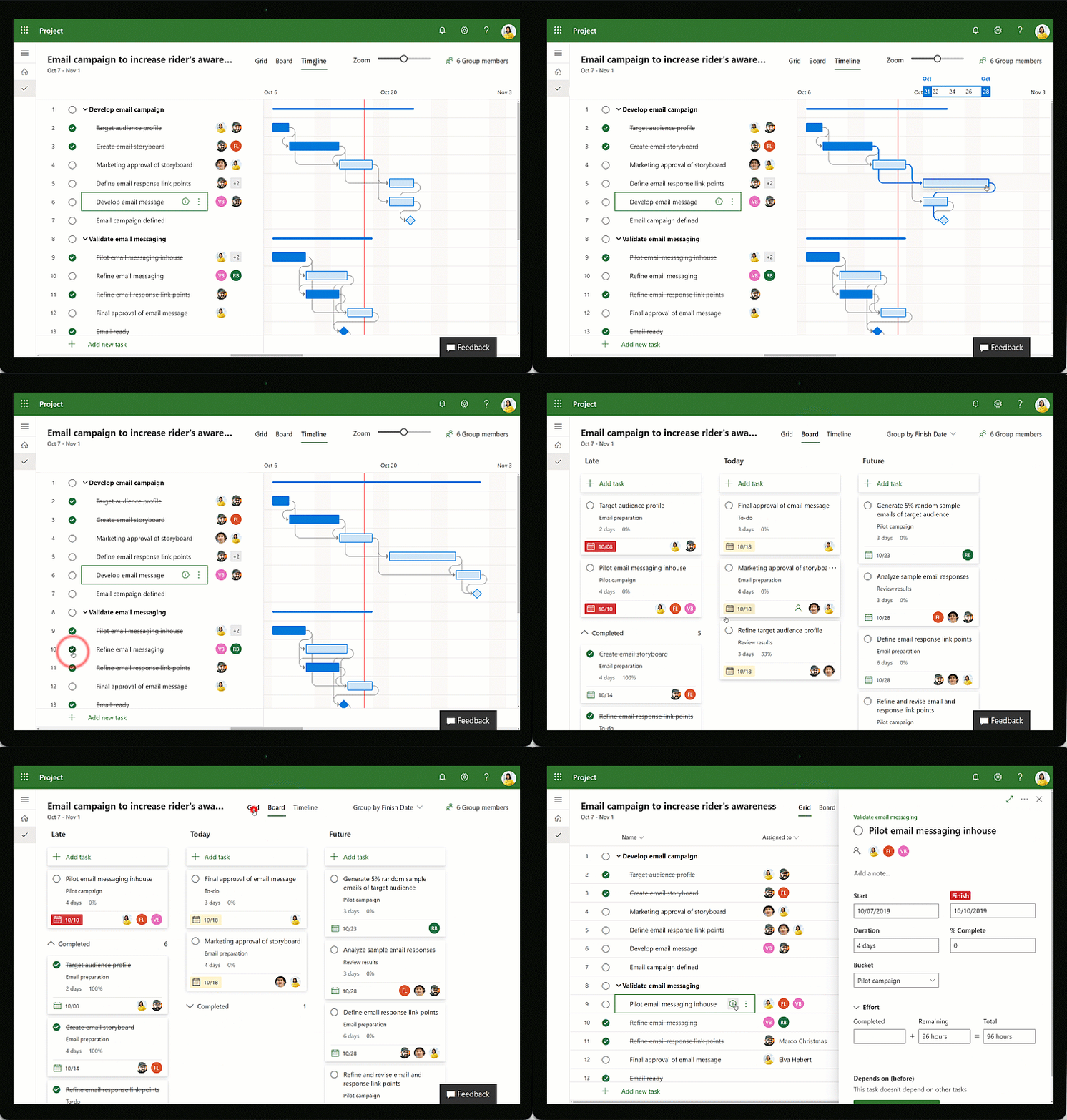
Microsoft Project 2024 Version, (Microsoft)
Microsoft Project 2024 is a software developed by Microsoft to support project management processes in areas such as planning, tracking, and resource management. This version is available both as a desktop application (Project Standard 2024 and Project Professional 2024) and as cloud-based solutions under Microsoft 365 subscriptions (such as Planner and Project Plan 3).
Microsoft Project is one of the few tools focused on traditional project management approaches. Other prominent software in this field include enterprise solutions such as Oracle Primavera P6, SAP Project System, EcoSys, and Deltek Open Plan. In particular, Primavera P6 is preferred in engineering and construction projects because it can scale to support tens of thousands of tasks and numerous users, while offering portfolio management features. Open-source alternatives such as ProjectLibre and OpenProj provide interfaces and core CPM (Critical Path Method) tools similar to MS Project but generally offer more limited functionality. Additionally, more agile-oriented project management tools such as Jira, Trello, and Asana have become widespread; however, they address MS Project’s time-based work breakdown and resource planning features in a simplified manner.
Microsoft Corporation. 2023. *Microsoft Project Online Feature Details.* January 26, 2023.https://learn.microsoft.com/en-us/projectonline/project-features-descriptions.
Microsoft Corporation. 2024a. *Microsoft Project Licensing.* Accessed May 18, 2025.https://www.microsoft.com/en-us/microsoft-365/project/microsoft-project-licensing.
Microsoft Corporation. 2024b. “Microsoft Project Empowers Aston Martin and Other Customers.” Microsoft.com. Accessed May 18, 2025.https://www.microsoft.com/en-us/microsoft-365/project/customer-stories
Microsoft Corporation. 2024c. “Planner ve Project Plan 3.” Microsoft 365. Accessed May 18, 2025.https://www.microsoft.com/tr-tr/microsoft-365/planner/project-plan-3.
Microsoft Corporation. 2024d. “Project Professional 2024.” Microsoft Store. Accessed May 18, 2025.https://www.microsoft.com/tr-tr/microsoft-365/p/project-professional-2024/cfq7ttc0ph40.
Microsoft Corporation. 2024e. “Project Standard 2024.” Microsoft Store. Accessed May 18, 2025.https://www.microsoft.com/tr-tr/microsoft-365/p/project-standard-2024/cfq7ttc0prmx.
Microsoft Corporation. 2024f. “What’s New in Project.” Microsoft Support. Accessed May 18, 2025.https://support.microsoft.com/en-us/office/what-s-new-in-project-111bcaf9-bc27-4c15-80e6-85e726307520
Microsoft Corporation. n.d. “New Microsoft Project Rolls Out Worldwide.” Microsoft 365 Blog. Accessed May 18, 2025.https://www.microsoft.com/en-us/microsoft-365/blog/2019/10/29/new-microsoft-project-rolls-out-worldwide/.
Microsoft Corporation. n.d. “The History of Microsoft – 1986.” Microsoft Learn. Accessed May 18, 2025.https://learn.microsoft.com/en-us/shows/history/history-of-microsoft-1986.
Softtrader. n.d. “Microsoft Project 2021 vs Microsoft Project 2024.” Softtrader.eu. Accessed May 18, 2025.https://softtrader.eu/microsoft-project-2021-vs-microsoft-project-2024/.
Ten Six Consulting. n.d. “Displaying the Task Path in Microsoft Project.” TenSix.com. Accessed May 18, 2025.https://tensix.com/displaying-the-task-path-in-microsoft-project/.

Microsoft Project
Full Name | Microsoft Project | ||||||||
|---|---|---|---|---|---|---|---|---|---|
Common Name | MS Project | ||||||||
Developer | Microsoft | ||||||||
Initial Release Year | 1984 | ||||||||
Category | Project Management Software | ||||||||
License Type | Commercial (Proprietary) | ||||||||
Platform | Microsoft Windows | ||||||||
Latest Version | Microsoft Project 2024 | ||||||||
Purpose of Use | Project Management Templates Collaboration (Team Work) Timelines Resource Management Project Planning Reporting | ||||||||
Version Options | Project Professional 2024 Project Plan 1 Project Plan 3 Project Standard 2024 Project Plan 5 | ||||||||
Future Changes | Integrated with Microsoft Planner | ||||||||
Project for the Web Service | Will end in August 2025 | ||||||||
History and Development
Core Features and Functions
Usage Areas and Industries
Licensing Models and Versions
Version Options and Licensing
Project Standard 2024
Project Professional 2024
Planner and Project Plan 3
Planner Transition
2024 Final Version
Key Features:
Alternatives and Comparisons with Similar Software