


This article was automatically translated from the original Turkish version.

GitLab
Name | GitLab | ||||||||
|---|---|---|---|---|---|---|---|---|---|
Founders | Dmitriy Zaporozhets, Sid Sijbrandij | ||||||||
Year of Establishment | 2011 | ||||||||
License Type | MIT (Community Edition), Commercial License (Enterprise Edition) | ||||||||
Developer | GitLab Inc. | ||||||||
Packages | GitLab Community Edition (CE) – Open source, GitLab Enterprise Edition (EE) – Commercial, corporate-supported | ||||||||
Core Component | Redis Workhorse GitLab Rails NGINX Sidekiq Gitaly PostgreSQL | ||||||||
Website | https://about.gitlab.com | ||||||||
Registered Center | San Francisco, California, United States | ||||||||
Supported Platforms | Linux (official), Docker, Kubernetes, Cloud services (AWS, GCP, Azure) | ||||||||
GitLab was founded in 2011 in San Francisco, California by Dmitriy Zaporozhets and Sid Sijbrandij. It is a platform designed to accelerate software development processes, detect errors at early stages, and automate workflows. GitLab is an open source and integrated DevOps platform that encompasses all stages of the software development lifecycle. It unifies operations such as implementing core DevOps methodologies like Continuous Integration (CI) and Continuous Deployment (CD), automating security testing, and managing container orchestration within a single system.
GitLab’s architecture is designed to support the DevSecOps approach, which integrates software security alongside DevOps methodologies. This platform enables development teams to work more efficiently while aiming to accelerate software processes enhance their security and quality.
GitLab is built on the Git version control system. Users can directly perform functions such as branching, merging (merge requests), commit history and code review through the GitLab interface. This facilitates asynchronous and secure code development processes for teams.
GitLab CI/CD supports automatic testing, building and deployment pipelines after every commit. Pipeline definitions can be easily created using a YAML-based gitlab-ci.yml file. GitLab Runners are agents that execute these processes and can be deployed on both local and Kubernetes environments.
GitLab provides comprehensive tools not only for developers but also for product and project managers.
GitLab integrates software security into every stage of the development lifecycle:
These security tests can be automatically triggered through pipelines.
GitLab’s flexible and scalable architecture enables large organizations to manage high-traffic software workflows. The following components form the foundation of this architecture:
GitLab Rails: The core service of GitLab. It is the main component that manages the web interface, REST API and numerous backend services. The majority of user interactions occur at this layer.
PostgreSQL: The relational database management system used by GitLab. All user data project metadata version history and configuration details are stored here.
Redis: A high-speed in-memory data store used for session management caching and job queue handling. It is critical to GitLab’s performance.
Sidekiq: A worker system configured to manage background jobs. Tasks requiring scheduling such as email notifications and pipeline triggers are executed through this structure.
Nginx: A reverse proxy server that routes incoming HTTP and HTTPS requests to GitLab components. It also terminates TLS encryption traffic.
Gitaly: A specialized backend service that centrally executes Git repository operations. Git operations such as cloning pulling and merging are performed efficiently by Gitaly.
GitLab Workhorse: A proxy server operating at the HTTP layer. It optimizes operations such as large file uploads API request routing and content transformation while relieving the main Rails application of load.
Prometheus + Grafana: Observability tools used to monitor GitLab’s system resources and performance metrics. Prometheus collects data while Grafana visualizes and analyzes it.
GitLab also provides reference architectures in which these components can be distributed horizontally. Based on requirements for high availability (HA) and load balancing PostgreSQL clusters Gitaly servers and CI Runner nodes can be deployed separately.
The architectural diagram below provides a detailed view of GitLab’s monolithic yet modular structure illustrating how system components interact with each other. GitLab’s architecture demonstrates how HTTP/SSH requests from users are processed by internal system components (Rails Redis PostgreSQL Gitaly etc.). This structure enhances developer productivity while enabling high availability and performance goals. (https://panlw.github.io/15365441001781.html)
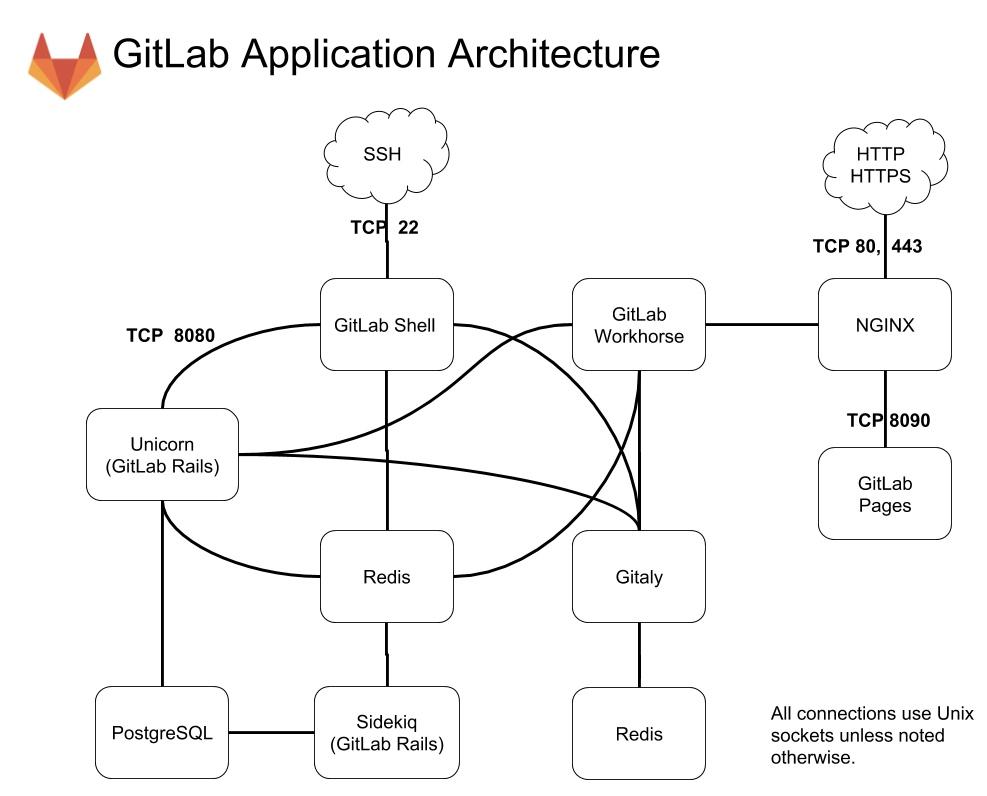
Gitlab Uygulama Mimarisi-
NGINX
GitLab Shell
GitLab Workhorse
Unicorn (GitLab Rails)
Redis
PostgreSQL
Sidekiq
Gitaly
Auxiliary Services
GitLab Pages (TCP 8090)
GitLab provides full support for Docker-based development and deployment workflows. Users can create manage and integrate their own container registry through GitLab. This reduces external dependencies and ensures processes are conducted within a closed secure environment.
Due to its open source nature GitLab has a rich educational and documentation infrastructure. GitLab University offers interactive learning paths on topics ranging from CI fundamentals to advanced pipeline structures.
GitLab is a fully integrated DevOps platform capable of meeting modern software development needs. While version control CI/CD security monitoring and collaboration are all provided within a single framework its open source structure customizability and enterprise compatibility enable it to serve organizations of all sizes.
GitLab’s modular architecture and high scalability capacity provide an ideal foundation for the future of automated software production processes.
GitLab. "CI/CD Pipelines." *GitLab Documentation*.https://docs.gitlab.com/ci/. Accessed May 15, 2025.
GitLab. "Container Registry." *GitLab Documentation*.https://docs.gitlab.com/user/packages/container_registry/. Accessed May 15, 2025.
GitLab. "Development Architecture." *GitLab Documentation*.https://docs.gitlab.com/development/architecture/. Accessed May 15, 2025.
GitLab. "Features." GitLab.com. Accessed May 15, 2025.https://about.gitlab.com/features/.
GitLab. "GitLab CI Fundamentals." GitLab University. Accessed May 15, 2025.https://university.gitlab.com/learning-paths/gitlab-ci-fundamentals.
GitLab. "Reference Architectures." *GitLab Documentation*. Accessed May 15, 2025.https://docs.gitlab.com/administration/reference_architectures/.
GitLab. "Security Hardening." *GitLab Documentation*.https://about.gitlab.com/security/hardening/. Accessed May 15, 2025.
GitLab. “Runner.” *GitLab Documentation*.https://docs.gitlab.com/runner/. Accessed May 15, 2025.
OSTI. "Modern DevOps Infrastructure for Scientific Applications." U.S. Department of Energy (OSTI). Accessed May 15, 2025.
Pan, Liwen. “GitLab Architecture: Internal Components Overview.” *panlw.github.io*. Accessed May 15, 2025.
Simplilearn. “What Is GitLab?” Simplilearn Git Tutorial. Accessed May 15, 2025.https://www.simplilearn.com/tutorials/git-tutorial/what-is-gitlab
Springer. “A Comparative Study on CI/CD Tools in Research.” Springer Open Access. Accessed May 15, 2025.https://link.springer.com/content/pdf/10.1186/s41469-020-00087-8.pdf
TechTarget. “GitLab Definition.” *TechTarget WhatIs*. Accessed May 15, 2025.https://www.techtarget.com/whatis/definition/GitLab
Vassallo, Cristina, Alberto Bacchelli, Harald Gall, and Michele Lanza. “CI/CD Feedback in Student Software Engineering Projects.” *Proceedings of the 2020 IEEE/ACM 42nd International Conference on Software Engineering: Software Engineering Education and Training (ICSE-SEET)*. ZORA Repository, University of Zurich.https://www.zora.uzh.ch/id/eprint/198329/1/VassalloFSE2020.pdf. Accessed May 15, 2025.

GitLab
Name | GitLab | ||||||||
|---|---|---|---|---|---|---|---|---|---|
Founders | Dmitriy Zaporozhets, Sid Sijbrandij | ||||||||
Year of Establishment | 2011 | ||||||||
License Type | MIT (Community Edition), Commercial License (Enterprise Edition) | ||||||||
Developer | GitLab Inc. | ||||||||
Packages | GitLab Community Edition (CE) – Open source, GitLab Enterprise Edition (EE) – Commercial, corporate-supported | ||||||||
Core Component | Redis Workhorse GitLab Rails NGINX Sidekiq Gitaly PostgreSQL | ||||||||
Website | https://about.gitlab.com | ||||||||
Registered Center | San Francisco, California, United States | ||||||||
Supported Platforms | Linux (official), Docker, Kubernetes, Cloud services (AWS, GCP, Azure) | ||||||||
Key Features of GitLab
Version Control System
CI/CD (Continuous Integration & Continuous Deployment)
Project and Release Management
DevSecOps-Compliant Security Features
GitLab Architecture
GitLab Application Architecture: A Component-Based Overview
Entry Points and Routing Layer
Application Layer
Support and Background Layers
Repository Layer
Container and Registry Systems
Educational and Documentation Capabilities
Academic and Industrial Use Cases